The visitor taps.
You call straight back.
Callback in the widget rings the visitor while their interest is still fresh. Anyone who can't talk right now books a time, and the widget calls then.
See callback in a demo- Called back within
- 45 s
- Modes
- 2
- Lines of code
- 1


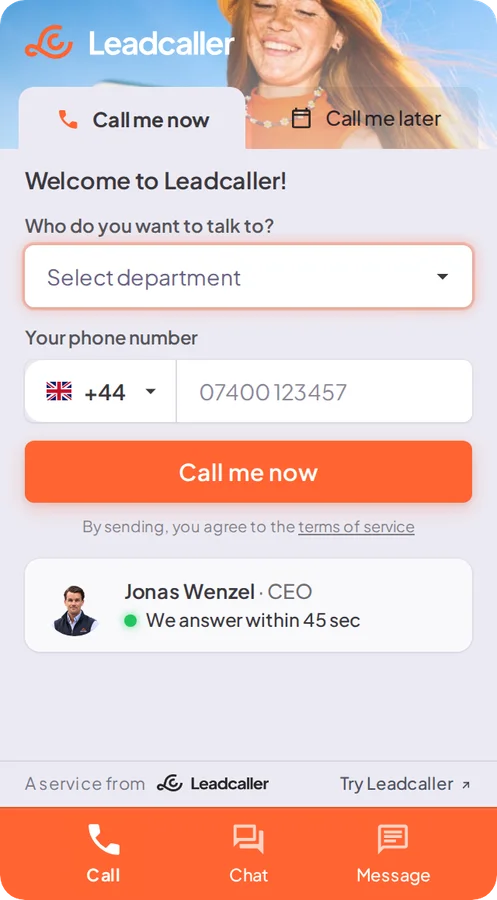
Call me now.
Your team first, then the visitor.
The visitor leaves their number in the widget. The widget first calls whoever on your team is free, and when you answer, the visitor is connected. Nobody waits in a queue.
- The visitor types their number and presses the button.
- The widget calls whoever on the team is free.
- You are connected within 45 seconds, and the details land in your inbox.
Call me later.
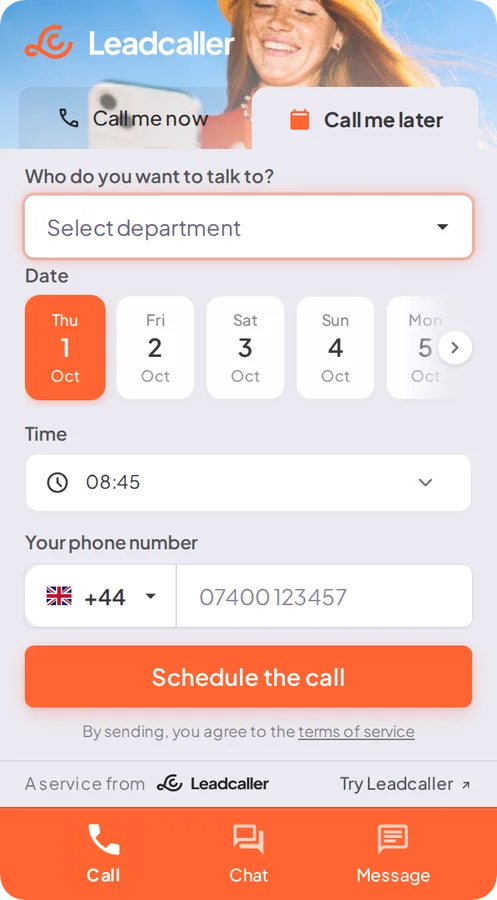
The visitor picks the time.
For visitors who can't talk right now. The widget shows your free times, the visitor books one and gets a call when the time comes.
- The visitor picks a day and a time.
- They leave their number in the same step.
- The widget calls when the time comes.
What you get
after every call.
Alerts by email and SMS
Contact details, summary, transcript and recording after every call.
Recording and transcription
The whole call as searchable text, with the summary at the top.
Staff and team routing
The call goes to whoever is free, per team or per subpage.
Your own number
Route calls through your existing phone provider and show your own number.
CallGuard when nobody answers
With CallGuard switched on, the call is answered even when the whole team is busy.
Messages outside opening hours
When you are closed, the widget takes a message instead of showing a queue.
What customers say
about a fast response.
-

Leadcaller has helped us get more expressions of interest and has been an effective way to generate leads for our business.
-

What makes it extra fun is that we always get back quickly (45 seconds at most) when someone asks, which always gets the call off to a positive start. We often hear customers laugh and say: "Wow, it really works!"
-

This has let us follow up and contact potential customers as soon as they show interest in our services. It is both smoother and faster than any other solution we have looked at.
-

After using the service for two months we have already seen a positive result, with several new leads that have led to increased sales.
Quotes translated from Swedish.
Common questions.
Who is called first, you or the visitor?
Your team is called first. When someone answers, the visitor is connected, so no visitor waits in a queue.
What happens if nobody on the team answers?
If CallGuard is switched on, it takes the call and saves the enquiry. Otherwise the widget takes a message with a number and the reason, and you call back when you can.
Can the visitor choose a later time?
Yes. In Call me later mode your free times are shown. The visitor books one, and the widget calls when the time comes.
Which number does the visitor see?
Calls can be routed through your existing phone provider, and the number shown is your own.
How do we get started?
Callback is part of the widget. You paste one line of code into your site and switch the mode on in the admin panel.
The rest of
Leadcaller.
- Website widget The widget Calls the visitor back within 45 seconds, or when it suits them. Chat and messages live in the same icon.
- Voice agent, in beta AI receptionist Answers when you can't, asks what you need to know and files the call with a summary in admin.
- Proactive chat, in beta Ambient Agent Reads how visitors behave on your site and lets the widget make the first move when someone hesitates.
- SMS campaigns Outreach Upload your contact list, let the AI send the texts and book the meeting when someone replies.